Using Address & Leak Sanitizers in C & C++ Code


Memory safety is a big topic in software development, especially in the areas of real-time and mission-critical software, and this is also the primary reason why people criticize C & C++ and promote memory-safe languages.

Nonetheless, C and C++ continue to be prevalent and will remain so for the foreseeable future. A significant portion of the web, databases, and kernels incorporate C and C++. The simplicity, familiarity, availability, and ecosystem surrounding C and C++ is huge.
Therefore, we’ll have to write and maintain C and C++, and fortunately, there are tools available to assist us in identifying and correcting many memory-related errors, with sanitizers being one such tool.

Introduction to Sanitizers
Sanitizers are the tools created by Google to detect address, memory, and other errors. However, the actual code resides in the LLVM repository, and in most cases, you can either use it directly or by enabling configurations in IDEs like Visual Studio and CLion.
In this blog, we’ll understand the usage of sanitizer using the command line g++ in the debian linux environment.
There are lots of sanitizers like
Address Sanitizer
Leak Sanitizer
Threads Sanitizer
Memory Sanitizer
This blog is all about using the Address Sanitizer which includs the Leak Sanitizer.
Address Sanitizers
Address Sanitizers are used for memory error detector in C & C++ programming language and logs various categories of address related errors.
Dangling Pointer Error (Use after free)
Let’s see a simple C++ code below
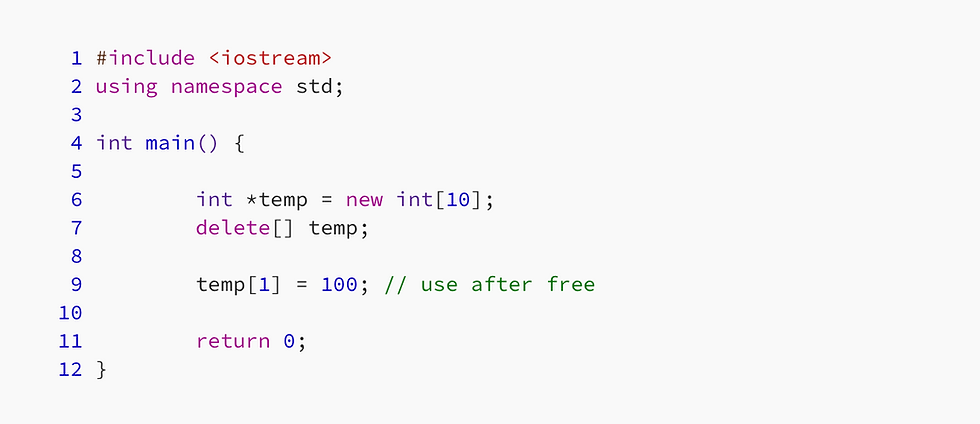
In the code above, we can see that we’re using temp[1] = 100 after delete[] temp
Let’s compile the code with Address Sanitizer using g++
g++ <filename>.cpp -fsanitize=address
and when we run the a.out we get the following output

You have to just look into the first few lines to be able to get what this error is all about

you can see heap-use-after-free at a particular address.
However, in the whole error message you can’t see the line number at which the error has occurred and this is fine for a few lines of code as shown above but will not work for real world work items.
So to make sure that we get the line number associated with the error must be reported we have to compile the code with -g options
g++ <filename>.cpp -fsanitize=address -g
and here is the output we’ll get after this

you can see the source line number which is causing this error to occur.
Stack & Heap Buffer Overflow
One of the biggest issue of C and C++ programs are bounds checking of the static and dynamic buffers. To prevent this we need to do costly bounds check each and every time we’re accessing the buffer.
With Address Sanitizer, we can see the stack and help buffer overflow.
Let’s see the code snippet below

And the address sanitizer correctly provides the stack buffer overflow issue as depicted the result snippet below
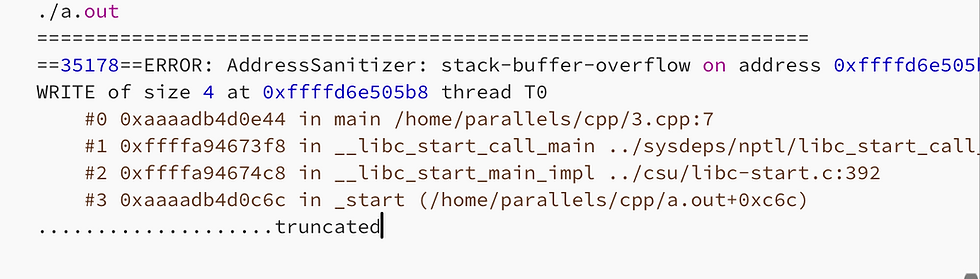
Similarly, if we run the code snippet below

We’ll correctly get the heap buffer overflow from the address sanitizer

What about C++ STL code ?
Modern C++ is incomplete without STL and if sanitizers are not working for STL, then its likely be unusable for more of the modern C++ code.
Fortunately we’ll get both stack and heap buffer overflows for STL also.
Let’s see a simple STL code of std::array<> as written below where we have the issue of stack buffer overflow

When we compile and run the same, we got the same stack buffer issue by using address sanitizer as reported below
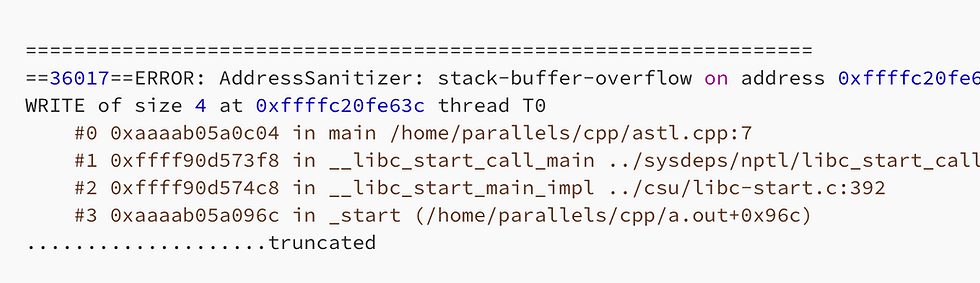
Let’s see another set of code with std::vector<> where we’re trying to do buffer overrun.

and this is reported as heap buffer overflow by the address sanitizer as

It Works with STL, but do consider this ..
The heap memory allocated by the STL containers like vectors are not linear based on the usage in the code. To achieve what we call it as amortized constant time, vector usage mathematical factor to increase its size
A vector when reached its limit increases the size of vector by 1.5x — 2x depending upon the compiler
So whether the sanitizer can catch heap buffer overflow or not is based on the vector capacity and not on the current vector size As an example, let’s have a look at the code below

Even though we’re not using v1[3], it will not raise any issue because the capacity of the vector is still 4 .
However, if we change the code and try to access the v1[4] , we’ll get the heap buffer overflow error.
Why this is an important factor?
STL containers memory is not allocated linearly and is based on the usage of the container. Hence, to make it reliable you need to unit test with all possible ranges so that any potential issue can be caught by the sanitizer
Global Buffer Overflow
Similar to stack and heap buffer overflow, there is something called global buffer overflow and as the name suggest, it reports any global buffer overflow allocated statically.
if the global variables is allocated dynamically, then even for the global variable the reported error will be heap buffer overflow
Let’s see a simple C++ example below

And the reported output will be

The Leak Sanitizer
Memory leakage in C & C++ programs were the primary trigger for the creation of things like garbage collection. This is where the leak sanitizer comes into picture
The leak sanitize identifies the memory leaks within the code.
Let’s see a simple example of a code which has new[] but has no corresponding delete[]

When we compile the code as
g++ leak.cpp -fsanitize=address -g
and run the code, here is the output we get

it clearly identifies the leaks happened for a particular variable.
I do hope and believe that this will help you to write address and memory issues free C & C++ code.
Thanks for reading..
Daksh


Comments